AI workflows
Generate MongoDB queries from natural language
Draft reviewed find filters and read-only aggregation pipelines from plain English without automatically running model output.
mongoui can turn a plain-English request into a MongoDB find shape or a read-only aggregation pipeline. Generated work lands in the normal editor. It never runs automatically.
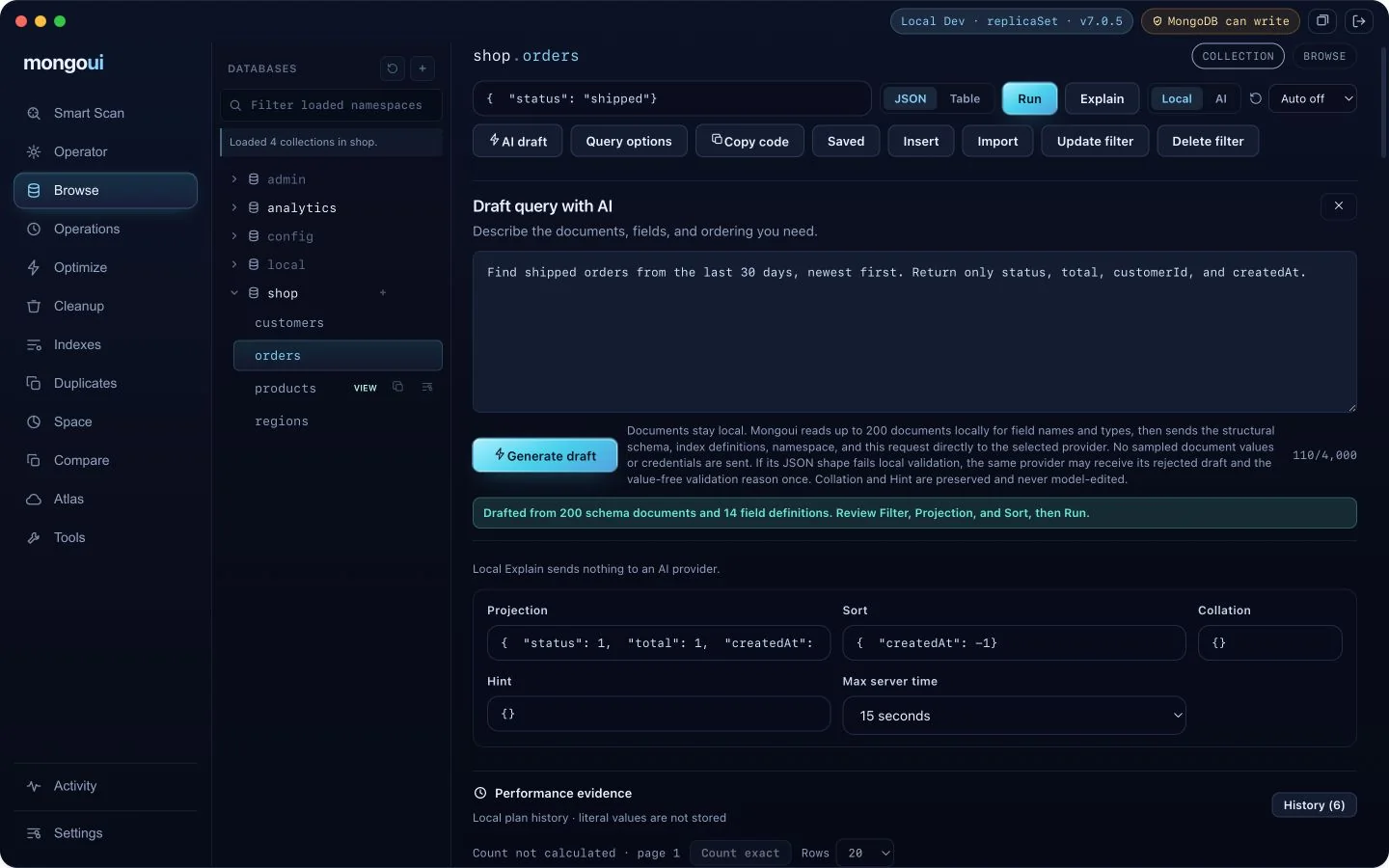
Draft a find query
- Open Browse and choose a database and collection.
- Choose Draft query with AI.
- Describe the documents, fields, and ordering you need.
- Choose Generate draft.
- Review the filter, projection, and sort placed in the Browse editors.
- Run the query when the BSON and target are correct.
A useful request is explicit about time, status, fields, and ordering:
Find shipped orders from the last 30 days, newest first. Return only status,
total, customerId, and createdAt.
Collation and hint remain user-authored. The model does not edit them.
Draft an aggregation pipeline
- Open Optimize for the target collection.
- Choose Draft pipeline with AI.
- Describe filtering, grouping, transformations, ordering, and output.
- Generate the draft and inspect every stage.
- Run or analyze the pipeline from the existing Optimize workflow.
Generated pipelines are restricted to read-only stages. mongoui rejects write stages
such as $out and $merge, plus server-side JavaScript, before a draft can enter the
editor.
Validation happens locally
For either draft, mongoui reads up to 200 documents locally to infer field names and BSON types. It sends only that structural schema, index definitions, namespace, and your request directly to the selected provider. Sampled document values, connection strings, and credentials stay local.
The response must match a strict local JSON contract. If it fails, mongoui may send the rejected draft and a value-free validation reason back to the same provider once. The corrected response must pass the same validation. Canceling drafting discards the request and leaves the editor unchanged.
Treat the draft as code review
Check these before running:
- the database and collection are the intended target;
- date and identifier values use the required BSON types;
- the filter is narrower than an accidental full-collection read;
- projection does not hide
_idwhen you plan to edit a result; $matchappears early when it can reduce aggregation input;- no generated assumption changes business meaning.
Save a useful query or pipeline after review. Saved work is scoped to the deployment identity and namespace, so a query for one cluster does not silently appear as trusted work on another.
See Configure an AI provider for provider and key handling. Use the AI Database Operator when the request needs multiple inspected steps instead of one query draft.