Workflows
Edit documents and run guarded bulk updates
Insert, edit, replace, delete, and bulk-update MongoDB documents through exact review, dry runs, Activity evidence, and Undo.
Browse supports exact document work and set-based maintenance. Single-document edits
are bound to _id. Multi-document updates and deletes use a separate dry-run and Undo
workflow.
Edit one exact document
- Open Browse, choose a collection, and run a query that includes
_id. - Open the document action menu and choose Edit document.
- Review the canonical Extended JSON loaded from MongoDB.
- Change the document and review the exact field diff.
- Apply the replacement.
The exact document is loaded again by _id before review. If it changed, disappeared,
or no longer matches the reviewed pre-image, the stale edit is blocked. Canonical
Extended JSON preserves BSON values such as ObjectId, Decimal128, Int64, dates,
and binary data.
Browse also supports inserting a reviewed document, cloning an existing document with a new identity, updating one field, replacing one document, and deleting one exact document. Available actions depend on collection type, server capability, projection, and access mode.
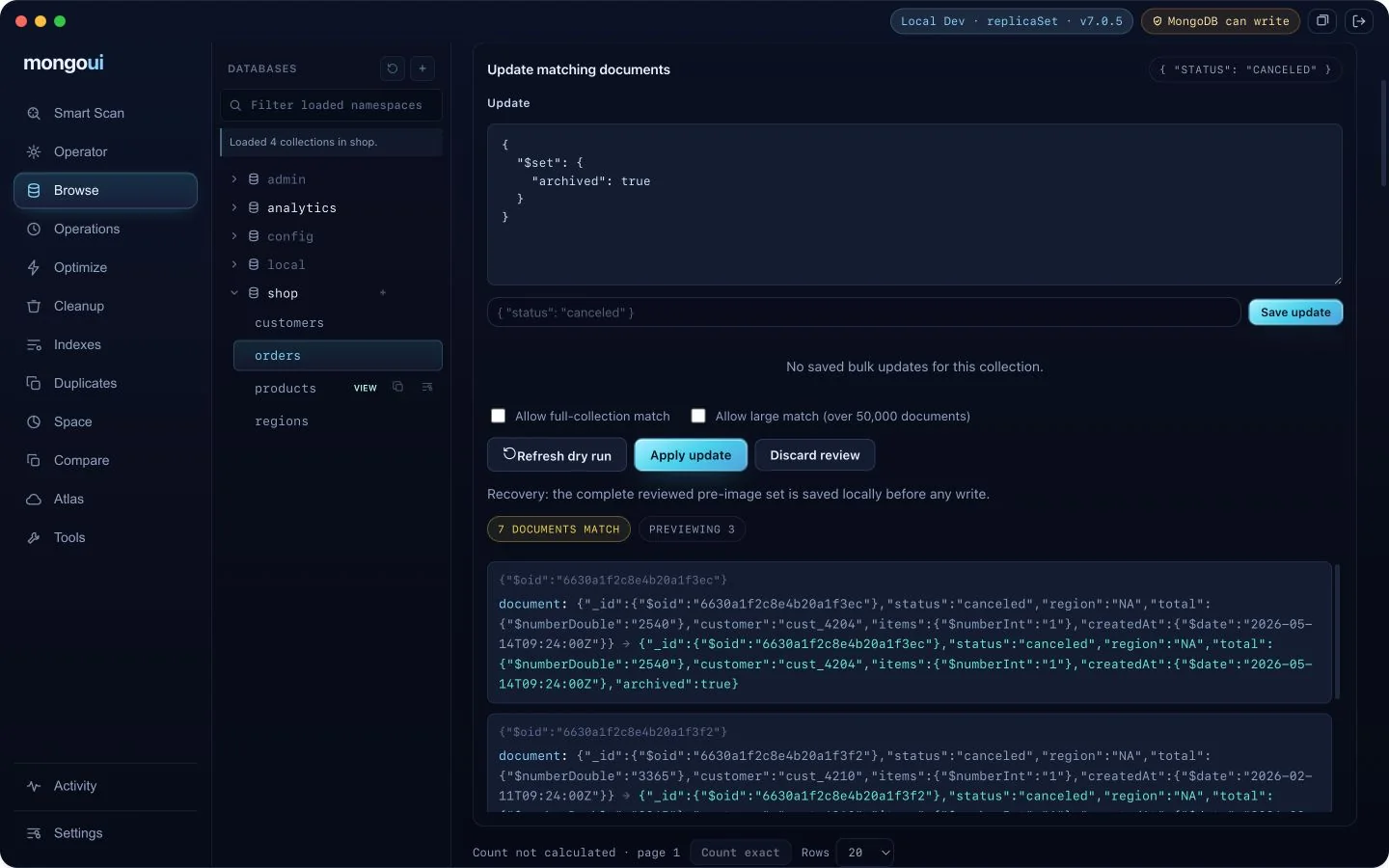
Update matching documents
- Set the Browse filter to the intended population.
- Choose Update matching.
- Enter the MongoDB update document or supported update pipeline.
- Add collation, hint, or array filters when required.
- Choose Dry run.
- Review the matched count, sampled before and after values, and operation fingerprint.
- Choose Apply only while the filter, update, options, and evidence remain current.
Changing any approval-relevant input invalidates the dry run. Run it again before applying. You can save a reviewed bulk-update draft for the current deployment and namespace, then reopen it later for a fresh dry run.
Delete matching documents
The delete workflow uses the same filter and dry-run boundary. There is no blind
deleteMany button. Review the matched set and exact operation fingerprint before
apply.
Undo uses captured pre-images
Before a guarded bulk mutation, mongoui captures the exact pre-images required for Undo and writes local Activity evidence. Undo restores only documents that still meet the recovery checks. Concurrent changes are reported as conflicts instead of being silently overwritten.
If the app cannot confirm whether an apply or Undo completed, it reconciles against Activity and blocks unchanged replay when the outcome is uncertain. Do not repeat the same write from another client until you have inspected the database and Activity.
Read-only connections block these mutations below the renderer. For a plain-English starting point, use the AI Operator or draft a cleanup request, then keep the same dry-run and approval path.